
Virtual Private Network (VPN):
Virtual Private Network (VPN): Encrypted internet connection that provides a secure, private network connection for safe data transmission. However, not all VPNs are created equal, so if you are considering utilizing a VPN, make sure to do your homework!
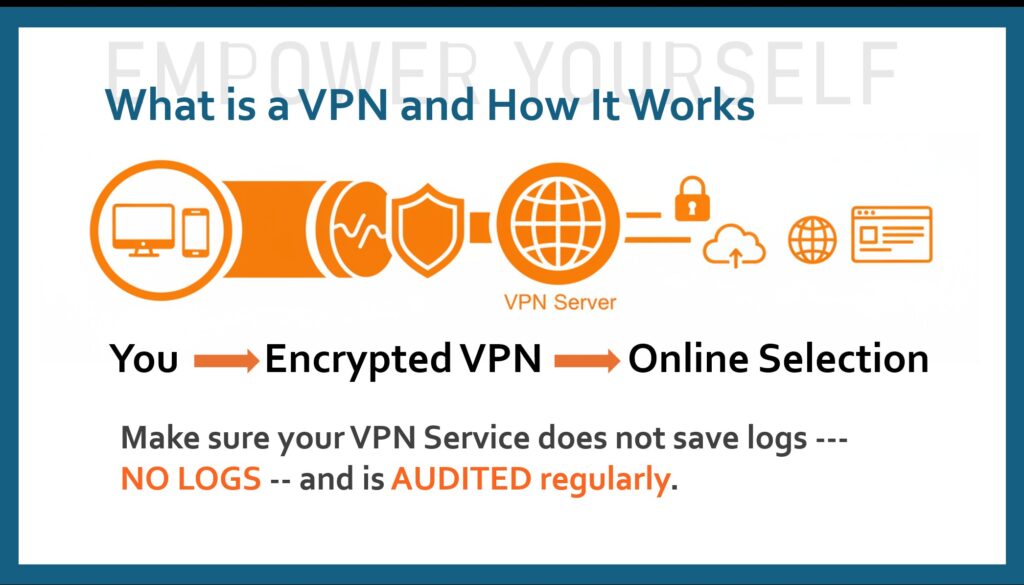
A VPN (Virtual Private Network) is a different tool from password managers or MFA/2FA. It focuses on encrypting your internet connection and hiding your real IP address**, rather than managing passwords or adding login factors. **Make sure when researching VPNs that the company is actually hiding your IP Address, since some do, and some do not.
VPN works by creating a secure, encrypted “tunnel” between your device and a remote server operated by a VPN provider. This process shifts your internet connection from your local Internet Service Provider (ISP) to the VPN’s private server, masking your identity and securing your data. Your encrypted data is passed through the VPN so it is much safer to transfer over digital means, and you can browse without being tracked (Again, if the VPN offers end-to-end encryption)
What Does a VPN Actually Do?
When you connect to a VPN:
- Your device creates an encrypted “tunnel” to a remote VPN server.
- All your internet traffic (browsing, email, streaming, etc.) routes through that server.
- Your ISP (and anyone snooping on your local network) sees only encrypted data going to the VPN server, not the actual websites or services you’re visiting.
- The websites see the VPN server’s IP address instead of yours, which masks your location and makes tracking harder.
How the Connection Works
This is especially useful on public Wi-Fi (cafes, airports, hotels), where unencrypted traffic could be intercepted. But is also good to use for home or office protection.
The transition from an open connection to a protected one happens in several steps:
- Authentication: When you launch the VPN app and click “connect,” the client software on your device verifies your identity with the VPN server.
- Encryption: All outgoing data from your device is “scrambled” into unreadable code (ciphertext) using a secret key known only to your device and the VPN server.
- Tunneling: The encrypted data is encapsulated—wrapped inside another data packet—and sent through a secure “tunnel” across the public internet.
- Decryption: Once the data reaches the VPN server, it is unwrapped and decrypted back into its original form.
- Forwarding & Masking: The VPN server sends your request to the intended website. Because the request originates from the server, the website sees the VPN’s IP address and location instead of your own.
What a VPN Hides
By routing your traffic through this encrypted tunnel, a VPN effectively conceals:
- Your IP Address: Your digital “home address” is swapped for the server’s, hiding your physical location.
- Browsing Activity: Your ISP can see that you are connected to a VPN, but they cannot see which specific websites you visit or what data you send.
- Data Content: Sensitive information like passwords, credit card numbers, and private messages are encrypted and protected from hackers, especially on public Wi-Fi.
When looking for a VPN service, make sure they do not save LOGS and they are audited regularly.